
Every chatbot gets questions it can’t answer. What should happen next has two parts. The person in the conversation needs a useful reply. The question also has to reach whoever can add the answer, or the bot will fail on it again tomorrow. Start with the reply.
The reply: a fallback that helps
A fallback message is what the bot says when it has nothing reliable to offer. A few rules make it useful:
- Say plainly that the bot doesn’t know, and don’t let it guess. A wrong answer about a refund policy does more harm than “I don’t have that information.”
- Offer a next step, such as a help center search, a contact form, or a handoff to a person if you have one.
- Don’t send the same “Sorry, I didn’t get that” again and again. After two misses in a row, offer the handoff.
- If a person takes over, pass along the conversation so the user doesn’t have to repeat the question.
For example:
I don’t have reliable information about that. You can search the help center, or I can pass this conversation to our support team.
The live handoff is the job of your chatbot or support platform. The rest of this article is about the question.
The question: record it for the people who maintain the knowledge
Decide what counts as unanswered
Use signals your code can see:
- The intent classifier hit its fallback or no-match intent.
- Retrieval found nothing relevant enough.
- The model reported that it couldn’t answer. Ask for a structured flag instead of searching the reply for phrases.
- The user said the answer didn’t help, or asked for a person.
Choose which of these you report. If you report every low-confidence turn, the real gaps get buried. If you only report complaints, you miss the gaps users don’t bother to flag. Start with one or two signals, read what comes in for a week, then adjust.
Record what an owner needs
A useful report has the question in the user’s words, what the bot replied, a short reason it counted as a miss, a topic tag, and your own conversation ID so someone can find the transcript. Remove names, email addresses and account numbers before sending, since reports end up in mailboxes and ticket queues.
Chatbot platforms often show the fallback rate and a list of unresolved questions. A report queue adds an owner, a status and a count to each question, so someone is responsible for fixing it.
Capturing the question with Kebivo
Kebivo is an open-source service you host yourself. It receives these reports, groups repeats and routes them by tag. When the bot falls back, your chatbot’s backend sends one HTTP request:
curl -i http://127.0.0.1:8000/api/v1/feedback \
  -H 'Content-Type: application/json' \
  -H "Authorization: Bearer $KEBIVO_TOKEN" \
  -H 'Idempotency-Key: conv-8841-turn-6' \
  --data '{
    "event_type": "knowledge_gap",
    "question": "Can I pay annually by bank transfer?",
    "previous_answer": "I do not have reliable information about that.",
    "context": "Fallback intent after two attempts",
    "tags": ["billing"],
    "conversation_id": "conv-8841",
    "agent_id": "website-chat"
  }'
Kebivo answers 202 Accepted with an event_id once it has stored the report. A few details matter:
- Send the request from your server. In browser JavaScript, anyone could read the project token. Give the bot a token with only the
feedback:gapscope, which can submit gap reports and nothing else. - Use an idempotency key you can repeat on a retry, such as the conversation and turn above, or a UUID you keep with the report. If a retry arrives with the same key and content inside the idempotency window (24 hours by default), Kebivo returns the original event instead of storing a second one.
- Send it in the background and log failures, so a failed report can’t break the conversation.
- Kebivo stores
conversation_idfor your own lookups without interpreting it. It isn’t included in webhook payloads.
The REST guide lists every field, limit and error code.
Route by topic
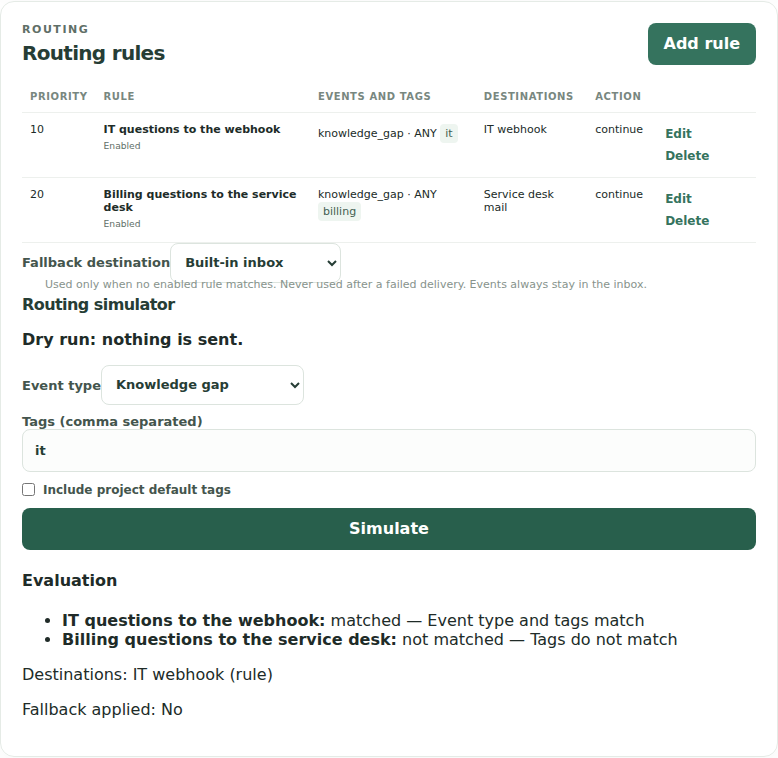
Rules match on tags and event type, run in priority order, and send to email over SMTP or to a webhook. A fallback destination catches reports that match no rule. Every report also stays in the built-in inbox, whatever the rules do.
By default, a destination sends when a question starts a new group or reopens a resolved one. If thirty visitors ask the same bank-transfer question this week, worded identically apart from case, spacing and end punctuation, the billing team gets one email and the inbox shows the group with a count of thirty. A reworded question starts its own group. You can set a destination to send every occurrence instead.
Webhook deliveries can be signed using the Standard Webhooks scheme. Delivery is at least once, so a receiver should skip any webhook-id (or X-Delivery-ID) it has already handled. The repository’s examples/webhook_receiver.py shows how to verify the signature, and the destinations guide has the payload format.
Work the queue
In the inbox, each group shows the question, how many times it was asked, and its status. Whoever owns the topic adds the answer to the bot’s sources, checks that the bot now answers it, and marks the group resolved. If the same question comes back, worded the same way, Kebivo reopens the group. A RAG feedback loop for unanswered questions walks through that loop in more detail.
Where Kebivo stops
Kebivo doesn’t write your fallback message, detect that the bot failed, transfer live chats or provide conversation analytics. It doesn’t change the bot’s knowledge either. It takes the reports your backend sends and gets each one to an owner.
To try it, the quickstart starts Kebivo with Docker and sends a first report. The README lists what Kebivo does and what it leaves to other tools. If your bot is an agent that can call tools, see an AI agent feedback loop with a human knowledge owner.
About Kebivo
Kebivo is open source under Apache-2.0 and runs in one container.
Product details checked against repository commit a5beddc.