
Search for “RAG feedback loop” and many results are about scoring answers: thumbs up and down, LLM judges, evaluation datasets, training on preference data. Those are useful. Many bad RAG answers have a simpler cause, though: the answer isn’t in the documents. Changing the retriever or the prompt can’t fix that. Someone has to write the missing page or correct the outdated one, and first they need to know which questions are failing.
Here is the loop in short. The app notices a question it couldn’t answer, the person who owns the content sees it, they fix the source, and they check that the question now gets answered. The first half applies whatever tools you use. The second half shows how Kebivo, our open-source feedback router, handles the middle steps.
The parts of the loop
1. Decide in code what “unanswered” means
The loop starts with a signal your application can act on. Some that work:
- Retrieval returned nothing above your relevance threshold.
- The model said the passages don’t answer the question. Ask for this as a structured field, such as
"answerable": falsein JSON output, instead of searching the reply for “I don’t know”. - The user said the answer didn’t help, with a button or a follow-up like “that’s not what I asked”.
- The user asked for a person.
None of these catches a confident wrong answer. Offline evaluations and user corrections cover that case. This loop handles the questions your app can tell it missed.
2. Record enough to act on
The person who fixes the content needs the question as the user asked it, what the assistant replied, and a short reason it counted as a miss (“no passage above 0.75”, “user clicked not helpful”). A topic tag decides who sees it. A conversation ID lets someone find the transcript later.
Leave out what they don’t need, such as names, email addresses and account numbers. Gap reports often end up in mailboxes and ticket systems that more people can read than your chat logs.
3. Group the repeats
If forty people ask whether the Pro plan includes SSO, the owner should see one item with a count of forty. Forty separate items would bury it. The count also tells them what to fix first.
4. Send each report to an owner
Billing questions go to whoever maintains the billing pages, and IT questions go to IT. A small team can send everything to one place. Either way, decide who owns each kind of question before reports pile up, because a queue nobody owns tends to be ignored.
5. Fix the source, then ask again
The fix happens in your documents, usually as a new page or a corrected paragraph. Re-index, then ask the original question again, or add it to your evaluation set so you’ll notice if it breaks. Close the item after that.
With one assistant and one person maintaining its documents, a database table and a weekly review can cover all five steps. A tool starts to pay off when you have several owners, or when you need to notice that a fixed question has started failing again.
How Kebivo handles it
Kebivo stores what you record in step 2, handles steps 3 and 4, and helps with step 5. Your application still decides what counts as unanswered, and a person still edits the documents. Kebivo runs as one self-hosted container with a SQLite database, and it doesn’t need an LLM or a cloud account.
Report the miss from your application
Put the report where your code already knows the answer failed. In this sketch, search_index and generate stand for your own retrieval and generation code:
MIN_SCORE = 0.75  # choose from your own retrieval tests

def answer(question: str) -> str:
    passages = [p for p in search_index(question, k=5) if p.score >= MIN_SCORE]
    if not passages:
        report_gap(question, tags=["docs"],
                   context=f"No passage scored {MIN_SCORE} or higher")
        return "I couldn't find this in our documentation."
    reply = generate(question, passages)
    if not reply.answerable:
        report_gap(question, previous_answer=reply.text,
                   context="Model said the passages don't answer it", tags=["docs"])
    return reply.text
report_gap sends one request to Kebivo’s REST API from a background thread, so a slow or failed report never delays the answer:
import json, logging, os, threading, urllib.request, uuid

KEBIVO_URL = os.environ.get("KEBIVO_URL", "http://127.0.0.1:8000")
KEBIVO_TOKEN = os.environ["KEBIVO_TOKEN"]  # project token with the feedback:gap scope

def report_gap(question: str, **fields) -> None:
    request = urllib.request.Request(
        f"{KEBIVO_URL}/api/v1/feedback",
        data=json.dumps({"event_type": "knowledge_gap", "question": question, **fields}).encode(),
        method="POST",
        headers={
            "Authorization": f"Bearer {KEBIVO_TOKEN}",
            "Content-Type": "application/json",
            "Idempotency-Key": str(uuid.uuid4()),
        },
    )

    def send() -> None:
        try:
            urllib.request.urlopen(request, timeout=10).close()
        except Exception as error:
            logging.warning("Kebivo report failed: %s", error)

    threading.Thread(target=send, daemon=True).start()
This version sends once. The repository’s examples/rest_python.py adds retries with backoff. It reuses the same Idempotency-Key on each retry, so Kebivo stores a retried report only once.
The same report with curl:
curl -i http://127.0.0.1:8000/api/v1/feedback \
  -H 'Content-Type: application/json' \
  -H "Authorization: Bearer $KEBIVO_TOKEN" \
  -H "Idempotency-Key: $(uuidgen)" \
--data '{"event_type":"knowledge_gap","question":"Does the Pro plan include SSO?","tags":["billing"]}'HTTP/1.1 202 Accepted
{"event_id":"4c10a887-02a0-476e-80f8-df6de424d1b7","status":"accepted","processing_status":"pending"}202 Accepted means Kebivo has stored the report, its group membership and a processing job. A background worker handles routing and delivery afterwards. The REST guide lists every field, limit and error code.
Repeats are grouped
By default, Kebivo groups questions that are identical after light normalization. It ignores letter case, extra spaces, curly versus straight quotes, dash variants and one trailing run of ?, ! or .. We sent these four questions to a local instance running Kebivo 0.1.1:
| Question sent | Result |
|---|---|
| Does the Pro plan include SSO? | New group A |
| does the pro plan include sso | Group A, count 2 |
| Does the Pro plan include SSO ?! | Group A, count 3 |
| Does the Pro plan support SSO? | New group B |
The last question means the same thing with a different word, so exact matching keeps it separate. You can merge the groups by hand. You can also turn on semantic grouping for a project, using an LLM provider you configure. That sends question text to the provider, so Kebivo asks you to acknowledge it first. The deduplication guide explains both modes, including exactly what semantic mode sends to the provider.
Each topic goes to its owner
Every accepted report stays in Kebivo’s inbox. Routing rules match on tags and send copies to email or to signed webhooks. For example, billing could go to the service desk mailbox and docs to a webhook that opens a ticket. By default, a destination sends when a question starts a new group or reopens a resolved one. Repeats in between raise the count without another email. The routing guide covers rule order, the fallback destination and the simulator, which tests rules without sending anything.
Close the item, and notice if it comes back
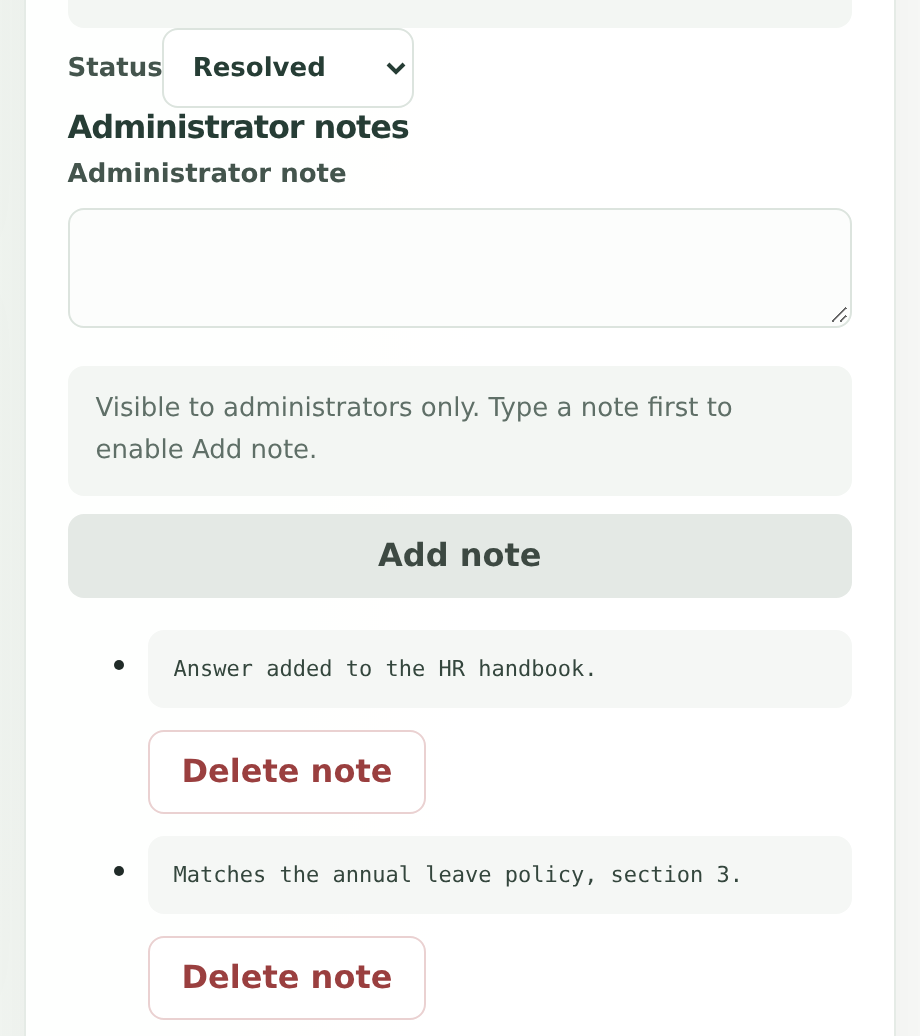
Each group has a status: open, in progress, resolved or dismissed. Notes record what was done, such as “Answer added to the HR handbook”. After you update the source and confirm the question gets answered, mark the group resolved.
If the same question arrives again after that (identical after the normalization above), Kebivo reopens the group and marks the new occurrence as the one that reopened it. That tells you the fix didn’t work. Maybe the page wasn’t indexed, people phrase the question differently from the page, or the retriever still ranks another passage first. A dismissed group stays dismissed.
What Kebivo doesn’t do
Kebivo doesn’t decide that an answer failed, and it never edits or re-indexes your documents. It doesn’t run evaluations or answer questions either. Your application sends the reports, and Kebivo keeps each group in front of its owner until someone resolves it.
The README covers the rest of the feature set and its limits. To try it, the quickstart starts Kebivo with Docker and sends a first report. If your agent is built with LangGraph or the OpenAI Agents SDK, the guides show how to let the agent report gaps itself over MCP. For chatbots with a fallback reply, see what to do when your chatbot can’t answer.
About Kebivo
Kebivo is open source under Apache-2.0 and runs in one container.
Product details checked against repository commit a5beddc.